
Start with the workflow you want the team to run
Hospitable already supports operational task rules, task assignments and teammate workflows. Adding Neatly should give your team a clear place to coordinate turnover jobs, cleaner instructions and AI staging-photo review. Decide which system will issue each cleaning assignment before activating overlapping automations.
New PMS reservations automatically create cleaning jobs in Neatly before checkout. Reservation changes update the related cleaning work by changing the job time or cancelling the job as appropriate. Neatly receives updates through webhooks or polling depending on the PMS connection; an exact delivery interval is not promised here.
For the first property, follow one reservation through the whole process: the imported listing, mapped Neatly property, assigned cleaner, required photos and review decision. That is a more useful setup check than a connection badge alone.
1. Check plan eligibility and account permissions
Hospitable’s current integration guidance says that Essentials does not include Connected Integrations or API access. Its app troubleshooting guidance identifies Host, Professional and Mogul as plans that can connect apps. Check your current plan and account access before beginning.
On the Hospitable side, the account owner or a full-access admin secondary user can connect apps. Restricted secondary access can show integration details without allowing the connection. On the Neatly side, have the account owner establish the PMS connection; a delegated manager can prepare the rollout checks without approving the owner’s connection.
Neatly allows one PMS provider per account. If another PMS is already connected, plan the transition with Neatly rather than removing it simply to make the connect button appear.
| Account | Who handles the connection | Check before starting |
|---|---|---|
| Hospitable | Account owner or full-access admin secondary user | Plan includes integrations and the user can approve access |
| Neatly | Account owner | Correct account, intended property portfolio and no conflicting PMS connection |
2. Choose Connect with Hospitable in Neatly
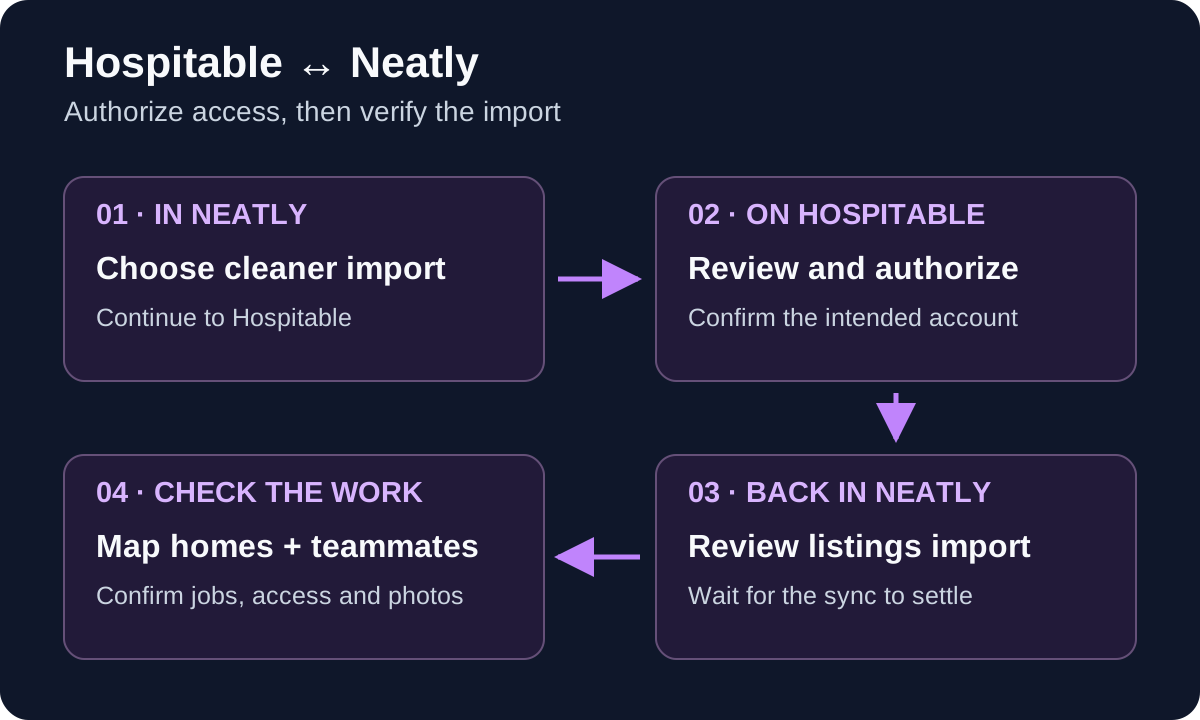
In Neatly, open PMS Integration from the sidebar. On the Hospitable card, select Connect with Hospitable. Before redirecting, Neatly offers an Also import my cleaners checkbox. Choose whether you want the cleaning-teammate details copied into Neatly, then select Continue to Hospitable.
The import choice copies teammate details for review. It does not create cleaner logins or send account emails at this step. You choose who gets a Neatly account later. If you already manage your cleaners in Neatly, review the existing people before importing another set of details.
Use the authorization route rather than sharing a PAT
Hospitable’s current public API guidance says Personal Access Tokens are for personal access and should not be shared with vendors; integrating partners are expected to use OAuth. Use Connect with Hospitable for the workflow in this guide. If you encounter a token-pasting option or cannot reach authorization, ask Neatly for help rather than sending a token to support.
3. Review access on Hospitable and return to Neatly
Confirm that the authorization page is on Hospitable and that you are approving the intended account. Review the permissions shown on that screen before authorizing Neatly. The consent screen is the place to inspect the access being requested; do not assume it is limited to reading cleaning dates.
After authorization, you return to Neatly’s PMS Integration page. The initial import runs in the background, so a successful return can precede the completed listings import. Allow the displayed syncing or importing state to finish and review any message before starting another connection attempt.
Check the resulting status, last-sync information and Listings panel. If the connection needs attention, follow the displayed action. Sync Now requests a data refresh; Reconnect takes the owner back through authorization when renewed access is needed.
| Checkpoint | What to verify |
|---|---|
| Hospitable consent | Correct account and permissions reviewed by an authorized person |
| Return to Neatly | Successful connection message or a specific error to address |
| Background import | Syncing has settled and the expected listings are visible |
| Reconnect prompt | Owner renews authorization; existing property and cleaner setup is reviewed rather than recreated |
4. Review property defaults before creating the mapped home
An imported Hospitable listing is not yet the same as a mapped Neatly property. Choose a representative Unmapped listing and select Create Property. Review the prefilled details, then confirm that the result shows Mapped to the intended home.
Hospitable data can prefill access instructions and descriptive information, as well as available check-in and checkout times. Confirm that the access instructions are appropriate for your cleaning team and that arrival and departure times match the property’s current operation. Fill in missing values instead of assuming a default time is correct.
The cleaning-price field deserves its own check. When available, a guest-facing cleaning fee from Hospitable can be used as the editable default in Neatly. Confirm the cleaner’s agreed payment amount before saving: the guest fee, cleaner pay and Neatly subscription are different amounts with different purposes.
Use a short property acceptance record
Record the Hospitable property or listing reference, mapped Neatly property, confirmed cleaner payment amount, access-instruction check and responsible operations lead. Repeat that record for each group of properties you add. If a previously connected listing offers Restore property, review the history with your account owner before choosing it or creating a replacement.
5. Review imported cleaners before creating access
If you selected Also import my cleaners, review the staged people and property assignments in Neatly. Importing a teammate’s details is separate from creating or linking their cleaner account. Account-creation actions can create access and send email, so choose the intended people and assignments deliberately.
Confirm the cleaner can open the pilot job, read its property instructions and carry out the checklist and photo workflow. A Hospitable teammate record or a suggested property match is useful setup information; the final check is the person’s actual access to the assigned Neatly work.
Keep an operations contact responsible for unassigned jobs and unexpected cleaner changes. For a same-day arrival, confirm both cleaning capacity and the person who will review the result.
6. Reconcile existing bookings and test new reservation updates
Check bookings already on the calendar separately from new reservations. Compare a sample of each against the mapped property and Neatly job. An initial connection or imported teammate list does not by itself demonstrate that every existing booking has the expected assignment.
Use an approved test reservation or arrange a controlled check with onboarding. For changed dates and cancellations, let the update reach Neatly, then check the job and cleaner’s current view. Ask the operations lead to review work already in progress when a reservation changes.
| Test | Expected check | Record |
|---|---|---|
| Existing booking | Mapped home, intended service date and the correct assignment | Reservation and job references; any missing or duplicate work |
| New reservation | Related cleaning job created before checkout | Property, service date and observation time |
| Date or time changes | Related cleaning work updated to the changed reservation | Previous and current dates, job result and cleaner confirmation |
| Cancellation | Scheduled clean cancelled as appropriate | Reservation status and resulting job status |
| Cleaner import | Selected teammate details reviewed; account access checked separately | Chosen person, property assignment and access confirmation |
Keep native Hospitable task rules separate from this import
Hospitable’s own task-rule setting for existing and new bookings applies to the bookings present when the rule is saved; its documentation says it does not continuously backfill older reservations. That setting belongs to Hospitable’s native task workflow. Check Neatly’s imported reservations and jobs independently, and agree which system is responsible for the cleaning instruction.
7. Test staging-photo review and the correction handoff
Choose clear reference photos showing the intended arrangement in the pilot home. Have the cleaner capture the requested spots from the job, then compare a reference and capture together. Neatly’s AI staging checks flag visible differences for team review.
Decide who reviews a flag, who requests another capture or a correction, and who makes the ready-for-arrival decision. Practice an acceptable variation as well as a visible mismatch so the team understands when to follow up.
Photo comparison supports review of visible condition. It cannot establish linen replacement, sanitization, odors or hidden cleanliness. Keep those checks in the cleaning procedure and use physical inspections where needed.
Troubleshoot the right stage of the connection
Use the visible message to identify whether the issue concerns access, authorization, import or mapping. Keep the affected property reference, reservation reference, last-sync time and expected result ready for support. Keep guest information and credentials out of public screenshots.
If Hospitable reports that the account is already linked to another Neatly account, involve the owner of that connection before attempting a transfer. Removing a connection and renewing consent are different actions. Do not treat disconnecting as a routine refresh: review any effect on current work and the provider-side access notice with Neatly first.
| Symptom | First action |
|---|---|
| Cannot approve an app | Check Hospitable plan and user permissions; involve the account owner or full-access admin |
| Authorization returns an error | Read the exact message and confirm the intended accounts |
| Connected but import is still running | Wait for the displayed import state to settle and check for a sync message |
| Listing present but no expected work | Check mapping, the reservation record and latest sync result |
| Cleaner imported but cannot see the job | Check account creation/linking and the actual property assignment |
| Reconnect requested | Have the Neatly account owner renew authorization through the displayed action |
Expand after the pilot passes
Add a group of properties your operations lead can review, rather than treating the first successful authorization as a portfolio-wide handover. Confirm mappings, cleaner payment amounts, access instructions and the existing-booking check for each group.
Keep a list of unresolved setup issues with a named owner and next update time. Expand once booking updates, cleaner access and photo review work for that group. Your first Neatly property is free, so use it to test the workflow with the team you already have.
Walk through your Hospitable setup with Neatly
Bring your property count, existing task rules and cleaner setup. We will help you review authorization, listing mappings and a real turnover workflow.
Book a Hospitable workflow demo·Explore photo verification