
Start with the departure and the condition record
Confirm the actual departure arrangements and your access procedure before dispatching the team. If a stay has been extended, make sure the operational schedule reflects the confirmed change. An old checkout date in a message or a calendar is not enough to establish that the property is available.
Gather the prior condition record, current property checklist and unresolved issues from the stay. Ask the coordinator to identify reported problems that still need an owner. This gives the incoming team context without asking them to reconstruct weeks of conversations.
A longer stay does not automatically mean excessive cleaning or damage. Assess what is present and agree the work needed. Keep facts about condition separate from assumptions about cause or responsibility.
Separate cleaning, replacement and repair before estimating time
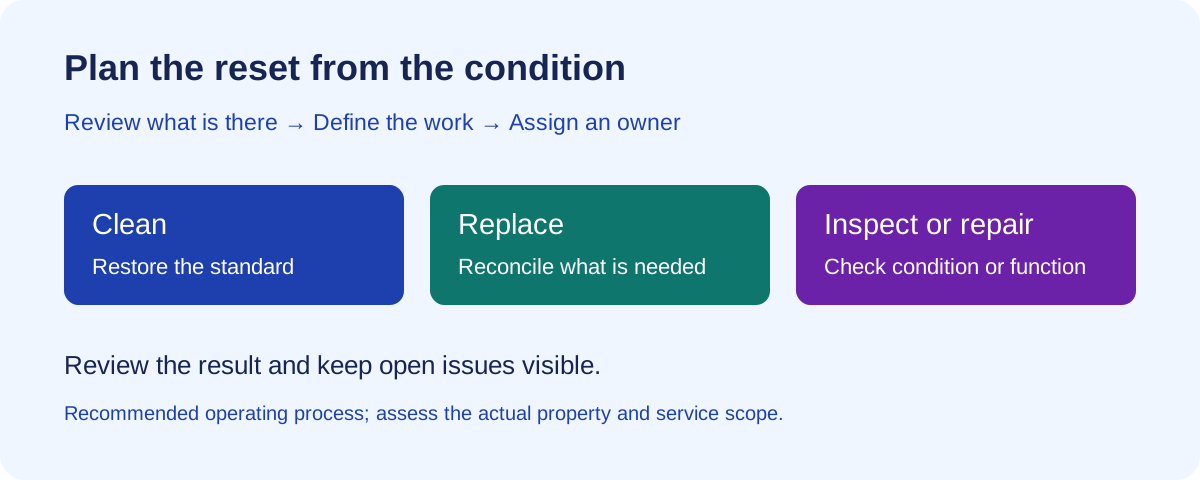
Use three work lists. Cleaning restores the required standard. Replacement addresses missing, depleted or unusable items. Repair or inspection addresses condition or function that cleaning will not resolve. A person can own more than one list, but each open item still needs a next action.
For example, a marked dining chair might need cleaning, further assessment or replacement. Record the visible condition first. Do not promise the next arrival that the issue is resolved just because the cleaner has photographed it.
| Finding | Scope decision | Owner and completion evidence |
|---|---|---|
| Kitchen buildup | Confirm the affected surfaces or appliance areas and suitable cleaning method | Cleaning lead; usable after-cleaning views. |
| Missing kitchenware | Check the inventory record, recount and arrange replacement if needed | Operations contact; updated inventory and confirmation. |
| Stained or worn linens | Assess laundering or replacement instead of remaking the bed with an unusable set | Linen owner; confirmed usable replacement set. |
| Reported appliance fault | Arrange an appropriate function check or service; a clean exterior does not prove operation | Maintenance contact; inspection or repair outcome. |
| Unclear starting photo | Request a clearer view before drawing a conclusion | Reviewer; usable view or physical assessment. |
Use the room-by-room reset checklist
Tailor the list to the property and its equipment. Include the areas your team can inspect and clean appropriately; refer specialist work to the right person. Follow product, material and appliance instructions rather than adding improvised cleaning methods.
Keep the final checklist specific enough for a replacement cleaner to follow. “Kitchen done” gives a reviewer little information about what was checked. A checklist line should identify the area or item, expected result and evidence needed.
| Area | Cleaning and reset | Separate review or follow-up |
|---|---|---|
| Kitchen | Clean the agreed appliance interiors and surfaces, cabinets where included, sink and food-storage areas; reset cookware and utensils | Check usable inventory against the property list; route appliance concerns separately. |
| Bathrooms | Clean the agreed fixtures, surfaces and storage; replace towels and replenish the promised starter supplies | Report leaks, damaged fittings or persistent condition concerns for assessment. |
| Bedrooms | Launder or replace the required linens, inspect their usable condition and reset beds and storage | Record missing items or condition needing replacement; do not hide an unresolved issue with staging. |
| Living and work areas | Clean agreed surfaces, floors and furnishings; reset furniture and the workspace to the current reference | Identify damaged furniture or equipment and arrange the appropriate check. |
| Laundry area | Clean the agreed accessible areas and remove leftover loads; check replacement linen availability | Escalate reported machine faults rather than treating an empty drum as proof of function. |
| Entry and arrival essentials | Reset the entry, confirm the current property instructions and replenish the supplies included in the stay | Confirm the relevant person has checked access arrangements and any outstanding arrival issue. |
Reconcile inventory without assuming every difference is damage
Use an agreed list of items that matter to the next stay: bedding, towels, kitchenware, workspace equipment and the supplies you promise. Record the expected item, observed count or condition and required action. Concentrate on a useful handoff rather than creating a catalogue no one will maintain.
When something is missing, check the record and likely storage locations before deciding it is lost. When something is worn, record the condition without calling it misuse. Before-and-after photos can support a review but do not establish who caused a difference.
Keep inventory findings and repair follow-up visible to operations after the clean. An item that needs replacement should not disappear into a completed cleaning checklist.
Use an issue handoff that survives the cleaning job
An issue needs enough detail for the next person to act without starting the investigation again. Keep the observed condition, supporting evidence and next decision together. Give the receiving person a clear request and confirm that they have accepted responsibility.
Use this copyable handoff: Property [identifier]; location [room/item]; observed condition [specific fact]; evidence [photo or record]; action needed [inspection, cleaning, replacement or repair]; owner [name/role]; next update [time]; closure evidence [what will confirm the result]. Store access details in your approved secure channel.
For a hypothetical missing-kitchenware issue, record the expected item and observed count, check storage, then assign purchasing if replacement is needed. For a hypothetical appliance fault, record the reported symptom and arrange an appropriate check. Neither a stock count nor a photo of the exterior substitutes for a function assessment.
Capture useful photos and assign a reviewer
Use consistent reference views for staging and add close views where condition needs assessment. Capture relevant starting conditions before work changes them, then document the result after the reset. Avoid collecting personal documents or unnecessary identifying information in operational photos.
Neatly’s AI staging checks and before-and-after photo review help identify visible cleaning issues and property damage. A person reviews the findings and decides what needs correction, another image or an on-site check. This is useful for remote oversight, while leaving accountability with the team.
Images cannot establish odors, sanitization, hidden conditions, equipment function or who caused damage. Do not use an attractive final room image as a substitute for checking a reported problem. AI video review and issue reports remain in development.
Keep mid-stay service separate from the departure reset
A mid-stay visit and an end-of-stay turnover have different scope and access arrangements. Confirm what a planned service includes, who coordinates it and how changes will be communicated. Do not assume a departure-based automation also schedules recurring visits during a longer reservation.
For each planned visit, record the property, agreed service, time window, assigned team and follow-up contact. If the stay changes, review both the departure reset and any separately planned work. Avoid creating duplicate jobs in multiple tools for the same visit.
Use your confirmed PMS or calendar connection for reservation-driven turnover work. During onboarding, confirm how separately planned mid-stay visits should be arranged and tracked by your team.
Close the handoff before the next arrival
Ask the reviewer to distinguish completed cleaning from unresolved property issues. For each open item, write down its location, what is observed, who owns the next action, the next update and what evidence will close it. Give the operations decision-maker the current facts while there is time to respond.
For example, a hypothetical turnover may have clean rooms and complete staging photos but still have a reported washer fault. The cleaner can finish the reset while maintenance investigates. Operations still needs to decide what the fault means for the next stay and communicate appropriately. A completed clean is not a completed repair.
Afterward, record which work was expected and which was discovered on arrival. Use that difference to improve the next scope estimate rather than applying one assumed duration to every midterm stay.
Check your longer-stay workflow in Neatly
Bring a representative property checklist, a recent turnover and an unresolved issue to a walkthrough. Review how supported PMS-driven cleaning jobs, cleaner coordination and AI photo verification fit your operation. Confirm the connection behavior and how any separately planned service work should be handled.
Use your own checklist to test how your team will assign the work, review photo findings and follow up on issues. Confirm any extra service arrangements during the walkthrough.
Sources and checklist scope
This checklist and the condition-to-scope worksheet are original operational guidance. Furnished Finder’s preparation guidance, checked on November 1, 2026, identifies furnished-rental essentials such as linens, kitchenware, starter supplies and arrival information. Use your own property inventory and agreed service scope to decide what needs resetting.
Mid-stay service arrangements and departure cleaning should be confirmed separately. The checklist does not prescribe a universal deep-clean interval, cleaning duration or number of photos.
Make longer-stay turnovers easier to oversee
Bring your cleaning checklist, PMS and photo-review process to a Neatly demo. Walk through coordination, visible condition checks and issue follow-up.
Book a turnover workflow demo·Explore photo verification