Choose the question before requesting the photo
A useful photo has a defined purpose. A wide bedroom view can show the bed arrangement and staging; a closer view may help assess a reported mark on a surface. Asking for more photos without specifying the question can leave you with a large gallery and the same uncertainty.
Build the photo standard into the property’s cleaning instructions. Identify the room or item, the useful angle and the visible result the reviewer should assess. Use the current staging reference so that an approved furniture change is not mistaken for a problem.
Keep the photo standard separate from the complete cleaning procedure. Tasks such as replacing linens and following the required cleaning process still need to be carried out even when a photo cannot establish that they happened.
Use a room-by-room cleaning photo checklist
Adapt these views to the actual property. There is no universal number of photos that proves a clean. Select enough views to answer the review questions, and add a closer capture when a specific concern needs context. A view of one corner does not establish the condition of an entire room.
Use reference images that are achievable in the real workspace. Ask a cleaner to test the requested angles and review the result together before applying the standard across jobs.
| Area | Useful capture and review question | What still needs another check |
|---|---|---|
| Kitchen | A view of the requested worktops and cooking area: are visible surfaces clear and is the setup correct? | Appliance interiors outside the view, hidden residue and equipment function. |
| Bathroom | Views that show the requested fixtures and supply setup: is a visible issue or missing item present? | Odors, hidden areas and the cleaning process itself. |
| Bedroom | A consistent view of the bed and surrounding staging: does the arrangement match the current reference? | Whether linens were replaced and the condition of areas the bedding covers. |
| Floors | Views of specified visible floor areas, with a closer capture of any concern | Areas behind furniture, under objects or obscured by glare. |
| Bins and storage | A view of the checklist’s accessible bin or storage area, opened when appropriate | Uncaptured containers, concealed items and quantity beyond what is visible. |
| Amenities and supplies | A readable view of the promised setup and relevant items | A complete stock count or working condition when a photo cannot establish it. |
| Reported issue | A context view identifying the area plus a close view of the observed condition | Cause, responsibility and any diagnosis or inspection needed. |
Download the cleaning photo review worksheet
Use this two-page worksheet to turn the photo checklist into instructions for your property. Page one is your photo plan; page two is a fresh review record for each turnover. Fill it in with a PDF editor or print it. You do not need a Neatly account to download it.
Keep the entries brief. For example, “bathroom sink and supply tray from the doorway” gives the cleaner a clearer target than “bathroom photo.” When something needs attention, record the concern, the photo that shows it, the person handling it and when they will report back.
Make before-and-after views comparable
Capture the relevant starting condition before cleaning or moving items changes it, then show the result after the work. Keep the area identifiable and use a similar angle where practical. A tightly cropped after-photo of a different surface may not answer whether the original concern was addressed.
Use enough light and avoid glare or a person’s shadow across the area being assessed. Check the capture before moving on: can the reviewer see the requested surface or object? If a photo is blurred or too dark, ask for another usable view rather than interpreting an unclear image as a pass or a failure.
Keep the photos associated with the correct property and turnover record. An image with no clear job context can create confusion when a reviewer is handling several jobs. Avoid capturing personal documents or other unnecessary identifying information.
- Use a context view to locate the issue and a close view when detail matters.
- Keep the reference arrangement current after an approved setup change.
- Request another view when framing or lighting prevents a decision.
- Do not assume two similar-looking images establish the cause or timing of damage.
Give the review a person and a checkpoint
Name who checks the captures, who communicates a correction to the cleaner and who handles a property issue. These may be the same person, but the responsibilities need to be explicit. Agree on a review checkpoint while the team can still respond, based on the actual turnover window.
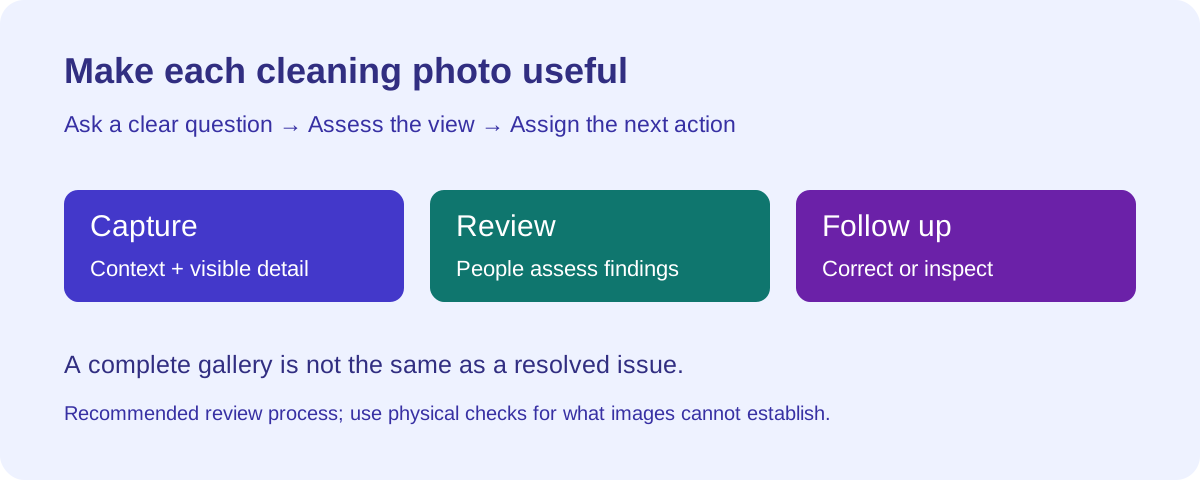
A photo upload and a completed cleaning status are different from a reviewed result. Your operations process should establish whether the necessary views were received, whether findings were assessed and whether open issues have a next action. Do not assume that a status label settles all three questions.
If the usual reviewer is unavailable, hand over the property, deadline and unresolved findings to a named replacement. Use a consistent job record so the next reviewer does not need to reconstruct the situation from scattered messages.
Turn each finding into a clear next action
Describe what is visible before making a judgment about cause. “A mark is visible on the kitchen counter” is actionable; “the cleaner damaged the counter” adds an allegation the image may not support. Ask for the information needed to decide the next step.
Use a short review note: property and job; room or item; observed condition; supporting view; action requested; responsible person; next update; evidence needed to close the item. Keep unresolved repair work visible after cleaning finishes.
| Review result | Next action | What closes the item |
|---|---|---|
| Required view missing or unclear | Ask for the specific area and a usable capture; arrange a physical check if the view cannot answer the question | Reviewer can assess the requested condition or records the required on-site follow-up. |
| Staging differs from the reference | Confirm the reference is current and ask for a correction when needed | Updated view shows the agreed arrangement, or the authorized standard is updated. |
| Possible visible cleaning issue | Check the affected area, coordinate the appropriate cleaning and request follow-up evidence | Reviewer checks the corrected area; physical assessment is arranged if uncertainty remains. |
| Possible property damage | Document what is visible and assign the appropriate assessment or repair follow-up | Responsible person records the outcome; an image alone does not establish liability. |
| Concern involves smell, hidden condition or function | Arrange the relevant on-site inspection or check | A responsible person verifies the issue in a way suited to the condition. |
Use Neatly’s AI photo checks to support the review
Neatly checks staging captures against reference photos and reviews uploaded before-and-after photos with AI to help identify visible cleaning issues and property damage. Your team assesses the findings and decides whether to request a view, arrange a correction or investigate further.
Review an AI flag in context: is the image usable, is the reference current and what condition is actually visible? An unflagged image is not proof that every cleaning task happened. Keep responsibility for the operating decision with a person.
This guide focuses on the photo workflow. Neatly also reviews workflow videos with AI and generates issue reports for your team to assess.
Know when remote review needs an on-site check
Photos cannot prove sanitization, replacement of linens, odors or hidden conditions. A staged bed does not establish what is under the covers. A clean-looking appliance exterior does not establish that it works. Use the cleaning procedure and appropriate physical checks for those questions.
Arrange an on-site assessment when the reported concern cannot be resolved from images or when a potential property issue needs inspection. The frequency and scope of routine physical checks should reflect the property, previous findings and your operational requirements. There is no photo count or universal inspection interval that removes the need for judgment.
If uncertainty remains close to arrival, give the operations decision-maker the current facts and remaining work. Avoid communicating readiness prematurely because the gallery looks complete.
Worked example: a mark after a kitchen clean
This is a hypothetical review example, not a customer result. A reviewer sees a possible mark in an after-cleaning kitchen image. The wide view identifies the worktop but the light makes the mark hard to assess. The reviewer asks the cleaner for a clearer close view while they are still available.
The next view shows a visible concern. The team determines whether an appropriate cleaning correction can address it or whether the surface needs further assessment. If cleaning is performed, the reviewer checks the follow-up evidence. If the condition may be damage, operations assigns the next assessment and keeps it separate from cleaning completion.
The record describes what was observed and what happened next. It does not assign responsibility simply because the mark appears in an after-photo. This is the difference between collecting an image and completing a useful review.
Improve the photo standard from repeated review problems
Look for recurring requests for another image, unclear instructions and findings with no owner. If reviewers repeatedly cannot see the same area, change the requested view and test it with the team. If the image is usable but the next action is unclear, improve the handoff rather than demanding more captures.
Bring a real property checklist, reference photo and example finding to a Neatly walkthrough. Test how your team will coordinate the job, review the available AI findings and follow up on issues.
Review your cleaning-photo workflow in Neatly
Bring a reference photo, a turnover checklist and a sample issue. See how cleaner coordination and AI photo review help your team decide what needs attention.
Book a photo-review walkthrough·Explore photo verification