
Define the work before assigning the team
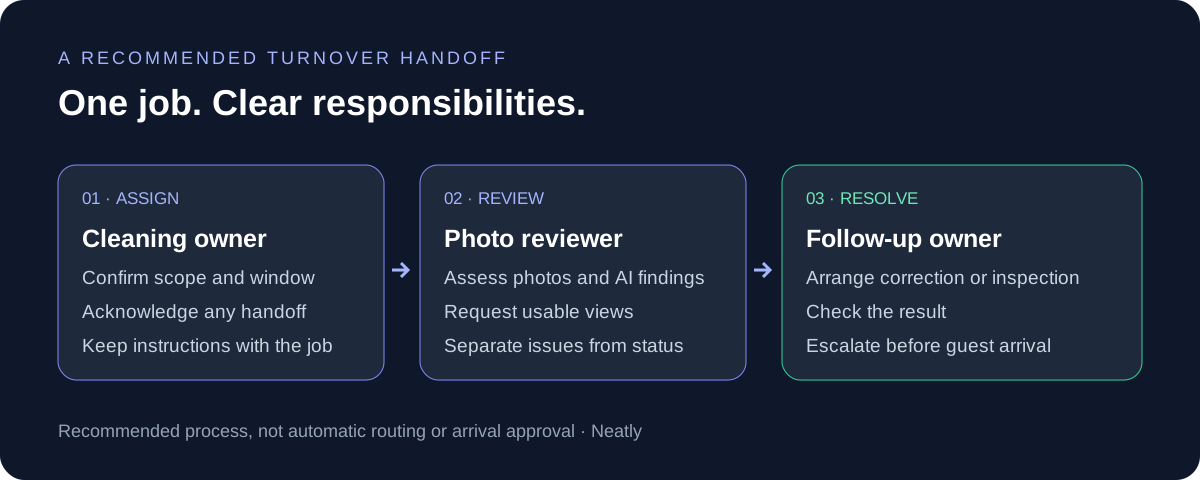
A cleaning team might be an individual cleaner, a company with its own supervisor or a mix of employees and contractors. The coordination problem is the same: someone must confirm coverage, someone must carry out the clean and someone must decide what happens when the result needs attention. Those responsibilities can belong to the same person, but they should not be left implicit.
Use the turnover as the unit of work. Give it a property, service date, available access window, expected scope and arrival deadline. A property-level cleaner preference is useful for planning; it is not a substitute for confirming who owns a particular job when availability changes.
- Coordinator: checks coverage, manages changes and confirms the current assignment.
- Cleaning owner: confirms the work, follows property instructions and documents the result.
- Reviewer: checks photos and reported issues and arranges any correction or inspection.
- Escalation contact: makes the operating decision if an unresolved issue threatens guest arrival.
Build a coverage matrix for primary and backup cleaners
Create a short coverage record for each property. Keep it practical enough that a coordinator can use it when a cleaner calls out. A named backup is only a candidate until availability, travel, access and the expected work have been confirmed.
Record a contact route for the company supervisor as well as the cleaner when a company supplies the crew. Agree who must tell you about a substitute, and confirm the substitute has the current instructions. Share access information through the appropriate secure channel rather than copying it into broad team chats.
| Record | What to capture | What to verify before assignment |
|---|---|---|
| Property and service | Property identifier, checkout clean or special service, expected work window | The cleaner is reviewing the correct property and type of work. |
| Primary contact | Cleaner or company supervisor, contact route, usual coverage | They have explicitly confirmed this job. |
| Backup contact | Alternative cleaner or supervisor and known coverage limitations | They have capacity, current instructions and access to this property. |
| Property requirements | Laundry process, equipment, travel constraints and special instructions | The replacement can complete the actual scope, not just arrive on site. |
| Reviewer and escalation | Person checking photos; person able to authorize next steps | Both know the next arrival time and how to reach each other. |
Separate booking automation from confirmed cleaning coverage
Check the complete chain: reservation received, cleaning job created, intended cleaner assigned, assignment understood and work window confirmed. A job appearing on a calendar does not establish that a person has committed to it. Decide when your coordinator will review unanswered or unassigned work, using the lead time your operation needs.
Your PMS may already offer cleaning task rules and backups. For example, Hospitable documents ordered backup offers when a primary cleaner declines, while noting that an offer does not guarantee acceptance. That is a Hospitable capability; do not assume the same behavior exists in another tool or connection.
Neatly creates cleaning jobs when new reservations arrive through supported PMS connections. Booking changes can change a related job’s time or cancel it, as appropriate. Webhooks or polling are used depending on the PMS. During onboarding, check the behavior of your own connection rather than assuming every update arrives instantly.
Use one authoritative handoff when a cleaner changes
Appoint one coordinator to change the assignment. If two people independently call different replacements, both cleaners can believe they own the work. First check whether the original cleaner has started, then confirm the replacement’s capacity and update the working job record. Tell the original cleaner or supervisor that responsibility has changed.
A one-off reassignment and a permanent property coverage change are different decisions. If a backup is covering a single absence, check that you have not accidentally changed the cleaner expected for future turnovers. Ask the replacement to confirm the property, time window and scope back to you.
| Field | What the receiving cleaner needs |
|---|---|
| Job identity | Property identifier, service date and the existing job reference. |
| Window | Access available from [time]; next arrival [time]; review checkpoint [time]. |
| Scope | Standard checkout clean plus any specific laundry, supplies or extra work. |
| Current position | What has already been completed, if anything; current access arrangements. |
| Photo standard | Which reference views and before-and-after captures are required. |
| Ownership | You are the confirmed cleaning owner; [name/role] reviews the result; [contact] handles exceptions. |
| Acknowledgement | Please confirm this property, window and scope before the coordinator marks coverage confirmed. |
Keep the standard consistent across different crews
Use one property-specific checklist and one current set of reference photos, even when several companies cover the same location. Keep permanent standards separate from instructions for one particular stay. A new amenity layout belongs in the property standard; an extra towel request for one arrival belongs with that turnover.
Walk a new cleaner through the expected views on a representative property. Check whether photos are close enough and well lit enough to review, whether the cleaner understands before-and-after captures and whether they know how to report an issue instead of quietly working around it. Treat unclear captures as a training or visibility problem before drawing conclusions about work quality.
- Confirm the checklist version and reference arrangement before rollout.
- Explain which photos document the starting condition and which document the completed work.
- Review the first photo set together and correct instructions that are ambiguous.
- Keep a named contact for questions about the property standard.
Assign photo review and issue follow-up separately from cleaning completion
A cleaner can finish the assigned work while a maintenance issue remains unresolved. Decide who reviews reported problems and who can arrange a repair, another visit or a physical inspection. Do not let a completed cleaning status become an accidental sign-off for an open property issue.
Neatly checks staging against reference photos and reviews uploaded before-and-after images with AI to help identify visible cleaning issues and property damage. Keep responsibility for assessing findings with a person. An unclear image may need another capture; a visible problem may need correction; an issue involving hidden condition or function may require an on-site check.
Photos cannot establish sanitization, odors, hidden conditions or who caused damage. Do not label a problem as a particular cleaner’s fault simply because it appears in a later image. Use the available photos, notes and timing to investigate, and describe what is visible without asserting an unproven cause.
| Finding | Next action | Who owns the next decision |
|---|---|---|
| Blurred or missing view | Request a usable capture of the relevant area. | Reviewer; cleaner provides the view. |
| Staging differs from the standard | Check the reference and coordinate a correction if needed. | Reviewer and current cleaning owner. |
| Visible cleaning issue | Confirm the affected area and arrange cleaning plus follow-up evidence. | Cleaning owner, with reviewer checking the result. |
| Possible damage or failed fixture | Document the condition and arrange the appropriate inspection or repair. | Operations or maintenance contact. |
| Issue unresolved near arrival | Escalate with the current facts and remaining work; do not promise readiness prematurely. | Named operations decision-maker. |
Worked example: a same-day cleaner replacement
This is a hypothetical process example, not a customer result or a recommended universal timetable. Suppose a property has an 11:00 checkout and a 16:00 arrival. At 09:00, the scheduled cleaner says they cannot attend. The coordinator contacts a backup, checks their travel and other jobs, and confirms they can take this turnover.
The backup confirms the scope and access window; the coordinator updates the job and tells the original team that coverage has changed. A reviewer is available at the team’s agreed checkpoint. If the required work and review no longer fit before arrival, the coordinator escalates immediately rather than treating the backup’s name on the schedule as a solution.
At review, a kitchen capture is unclear and a bathroom fitting appears damaged. The reviewer requests a clearer kitchen view and asks the appropriate contact to assess the fitting. The cleaner’s work and the repair are handled as separate responsibilities. The arrival decision stays with the operations lead until those facts are understood.
Measure handoff reliability before adding more automation
Review the exceptions with your team after a busy turnover period. Keep the measures specific enough to explain what failed. More completed jobs do not by themselves show that handoffs or property readiness improved.
If several handoffs fail for the same reason, fix that step before expanding the workflow. For example, repeatedly missing access instructions calls for a better property handoff; it is not evidence that you need to replace every cleaner or buy another scheduling tool.
- Coverage at checkpoint: which upcoming jobs have a confirmed cleaning owner, and which are still unresolved?
- Reassignment acknowledgement: did the original and replacement teams understand the change?
- Photo completeness: were the required views usable, or did the reviewer have to ask again?
- Issue ownership: did each reported problem have a person responsible for the next action?
- Correction follow-through: was the result checked after a return visit or another capture?
Test your team’s workflow in Neatly
Bring a real upcoming turnover, a cleaner substitution and a sample photo standard to a walkthrough. Neatly combines supported reservation-driven cleaning jobs, cleaner coordination, property instructions, checklists and AI photo review. Test what your team needs rather than evaluating fit by a property-count threshold.
Check which assignment changes apply to one job and which affect property-level coverage. Confirm the notification and booking-change behavior for your PMS. This guide’s coverage matrix, backup checks and escalation checkpoints are recommended operating practices; they are not a claim that Neatly automatically routes backups, optimizes travel or approves properties for arrival.
AI video review and video-generated issue reports remain in development. Use the available photo workflow when assessing current verification capabilities.
Sources and scope
This guide provides an original coordination framework. Provider documentation below was checked on October 29, 2026 for the distinction between assignments, backup offers and property access. Provider-specific features should be verified in your own account; they are not interchangeable with Neatly features.
Put your cleaning-team handoffs to the test
Bring your PMS, cleaner coverage and photo-review process to a Neatly demo. See how scheduling, job instructions and AI photo verification fit your operation.
Book a cleaning workflow demo·Explore photo verification